Showing posts with label Spring 2015. Show all posts

Thursday, April 16, 2015

FINAL EXHIBITION


Hi everyone!

Our final exhibition is this coming Saturday, April 18th. It will be held in Room 1103 of the building at 66 Fifth Avenue. The exhibition will be open to friends and family from 12 to 1 o'clock.

***We will be meeting in our normal room at 10 o'clock, so don't go to the wrong place by mistake!***

Sunday, April 12, 2015

FINAL WEEK!

Hiroshi Sugimoto, from Theaters (1978)
t’s hard to believe that this week is our final class. Your prints are all looking great and I can’t wait for you to see them.

Before Saturday, post the 20 images from your series to the class blog.

For the final class, you will need to hand in a DVD or USB containing the following:

-All of your final project photos (minimum 20). Turn in the highest quality versions of the files that you have. If you’ve done Photoshop work, I want the PSDs with layers intact.
-All of your homework assignments
-Make sure everything is clearly labelled in separate folders.

***Please note: This has to be turned in Saturday in order for you to get credit for the class (this is especially important for Scholars and Certificate students). If you give me a USB stick, I will likely not be able to return it to you (Scholars students: If you are using a USB stick that belongs to the Scholars department, I will return it for you).

MAKE SURE you have your files backed up at home before you turn them in to me. Emailing the files is not an option—they will be much too large.***


If you need a little extra time to organize everything, the classroom will be open at 9 on Saturday.

That’s all for now..be in touch ASAP if you have any questions or concerns.

See you Saturday!

Sunday, April 5, 2015

Homework - Week 9

Mari Juliano, South Korea, 2012
Hi Everybody!

Our guest this last week was the photographer and artist Mari Juliano. Her website is http://marijuliano.com.br and if you have any questions for her, she can be reached by email here.

So, next week will be our final critique! There are a lot of things we've got to wrap up before the final exhibition, so without further ado, here is this week's homework and what you need to bring to this week's class:

1. If you haven't sent me the first draft of your artist statement, I need it immediately. For those of you who have, you my notes and revisions in the next day or so. Please revise and email back to met BEFORE next class.

2. Next week (April 11th) is our final critique. Bring 10 new images form your series to share with the class.

3. Separate from this, next week you will be turning in 10 photos from your series to be printed for the exhibition. These need to be the highest quality files that you have--if you've done Photoshop work on them, I need the PSDs. These can be any 10 images from your series (new and old), your choice--bring your 10 best.

***Please note, I will be printing these photos after class next week. If  I don't have them in hand by the end of class next week, I won't be able to print them for the show and you won't receive credit for the class. If you will be absent this week, I need to hear from you by email ASAP so we can make other arrangements.

We have a lot to cover this week, so you need to come to class fully prepared since the critiques will begin promptly at 10. If you need extra time to prepare, come to class early. The classroom is open at 9, and I will be there between 9 and 930 if you need extra help.

Otherwise, use this week to finalize your projects, and please be in touch ASAP if you have questions about any of this.

See you next week!

PS--don't forget--we still have two weeks left. The final class is April 18th and will be our exhibition.

Sunday, March 22, 2015

Homework - Week 8

Ken Kitano, 43 girls in Harajuku, the fashion district for the youth. From the series Our Face, 2000
Hi Everybody!

This week's critique was great--thanks for coming prepared!

Remember, there is NO CLASS THIS SATURDAY, MARCH 28th because of Spring Break. The University Center (our usual building) will be open if you'd like to come in to use one of the computer labs, but otherwise we will be back on our normal schedule for class on April 4th.

If you were not in class last week because of Spring Break, make sure that you bring your images for the second critique to our next class--we'll look at them at the start of class.

Now, on to this week's HOMEWORK:

In addition to continuing to shoot for your project and building on the feedback you got from the last critique, you have a portrait assignment, to be posted to the blog before next class:

1-Pick a close friend or family member. Shoot a traditional, FORMAL  portrait. Pay close attention to the lighting and the background.
2-Take a portrait of the same subject/person where they are not in the frame. How you approach this is totally up to you--tell their story through objects, or their environment--whatever you think reflects their personality, character or history.
3-Take a self portrait. Approach or interpret this however you would like!

Most importantly, the first draft of your Artist Statement is due by email NO LATER then Thursday, April 2nd. The artist statement is a short paragraph that describes your project to the viewer. You can keep it very simple, you can be poetic, or you can open with a quotation, but the most important thing is that your statement covers the following:
1. What your photos are of or about
2. How/Why you chose your subject
3. Any special connection that you have with your theme
It should be short and sweet--no longer than a paragraph. I need this in hand BEFORE next class so I can edit it and return it to you for the second draft. The first draft doesn't have to be a masterpiece, so JUST WRITE!

Also, if you haven't done so already, post the images that you showed in class last week to the blog.

Believe it or not, class is almost done for the semester! We just have two sessions left before the final exhibition. Here is what is happening for the rest of the Spring:

March 28th - NO CLASS

April 4th - Open Lab to prep all of your work before the final critique. Also, we should have a guest speaker if all goes as planned.

April 11th - Final Critique! You will be showing 10 NEW images from your series. You will Also need to turn in the 10 images that you want to show in the final exhibition (can be a mix of any images that you've shot for your series).

April 18th - Final Exhibition!

Make sure you bring ALL of your photos with you to the next class. It will be the last chance that we have to work on your pictures in class before the final critique.

That's all for now. As always, please be in touch with any questions!

Sunday, March 15, 2015

Homework - Week 7

Lee Jeffries
Hi Everyone,

Great job this week! The portraits that I've seen so far have been great--I'm looking forward to seeing which one's you choose to share on the blog.

Just a reminder, if you were in class this last week, your homework is to choose your favorite photo from our portrait session and post it to the blog. Be sure to include the name of your subject! If you shot with my camera, you should have received a download link to your photos, in both RAW and JPEG format. If you have any trouble at all downloading or opening the pictures, please let me know ASAP.

By the way, since a few of you asked, I have posted the slide shows (including the most recent "Portrait" slide show) to the class Dropbox in a folder called "Lectures".

Next week is our second critique! Bring 10 new images related to your project to share with the class. Come prepared with them separated in to their own folder. We will get started right at 10 sharp (no delay like last time), so come early if you need to prep your files before class.

If you will not be in class next week because of Spring Break, you need to post your photos to the class blog before next Saturday. We will look at them in class and I will be in touch with the feedback from the class.

As always, please be in touch if you have any questions!

See you Saturday!

Sunday, March 8, 2015

Homework - Week 6

Willi Ruge, Seconds before Landing. 1931.
Hi Everyone!

For part one of this week's homework, you will be choosing one photograph from the Museum of Modern Art's Photo exhibition that engages (moves, frustrates, confuses, angers, or otherwise inspires) you. Use the"Reading Photos" worksheet that you filled out at the museum as reference. The worksheet will be turned in to me next class.

If you weren't in class today, or need another copy of the worksheet, it is posted in the class Dropbox. If you have trouble finding it, let me know and I will email you the file.

For part two of the homework, you will make a photograph that responds to the image that you chose. This is open to your interpretation-- you can recreate the image, or make an image that uses the same techniques or is a critique of the image--it's entirely up to you.

Post the photograph that you chose along with your response photograph to the class blog BEFORE next class--we will be looking at the photos together at the start of next week's class.

The MoMA's online photo archive can be accessed here.

The exhibition website is here.

The Thomas Walther Collection can be found online here.

Next class will be an open lab session (to prepare for our critique the following week) as well as an in class portrait shooting session. Be sure to bring your camera, your images for the next critique and a hard drive with you next week.

As always, please email me with any questions!

Sunday, March 1, 2015

Homework - Week 5

Aaron Siskind, Manzanillo, Mexico, 1955
Hi Everybody!

Well, despite having a rocky start to the class, I'm really pleased with how the first critique went and I'm excited to see your series develop over the rest of the semester! You all contributed some great feedback to your classmates and your homework this week (besides posting what you showed in class, which a number of you have already done) is to respond to that feedback and continue working on your series for the next critique. If you weren't in class last week, post your 10 images as soon as possible.

Just a reminder, if you are still having any trouble with the technical aspects of the class (manual photography, photoshop, downloading/uploading your images), please let Crystal or I know so we can help out. There are no dumb questions, as they say.

Next week will be a field trip, so please come prepared-metro card with two rides, writing utensils and notebooks, your Parsons ID card and High School ID card. It would be helpful to bring $10 for admission, just in case. Pack light, and be on time! If you are late, I can't promise we will still be in the classroom when you get there.

See you next week!

Monday, February 23, 2015

Basic Photoshop Tutorials


Hi everyone!

Here are a couple of basic Photoshop tutorials for your reference, There is a lot of content available for free on the web as well!

Photoshop Basic Tools:


Camera Raw Workflow:

Photoshop, GIMP, and Photo Editing at Home

Steven Klein

If you are interested in doing more advanced photo editing at home over the break or after the end of semester, there are a number of great options open to you:

Photoshop is now on available as a subscription-based photo bundle for $10 per month here.
There is a 30-day free trial, so if you are considering this route, be sure to do the trial first.

There is also an extremely simplified version of Photoshop with just the most basic tools called Photoshop Elements. It generally comes bundled with the software that comes with Wacom Tablets or some printers and scanners.

Another great alternative to Photoshop that many photographers prefer is Lightroom. It is made by the same company as Photoshop, but is designed for photographers who may not need all of the advanced retouching and compositing functions available in photoshop. It's also a lot less expensive.
The student-priced version can be found here.

Apple makes a photo-editing program called Aperture, found here. It is very similar to Lightroom and is priced about the same.

If you aren't interested in buying software, a popular option is GIMP, which is available for free download here: http://www.gimp.org. There are free tutorials here: http://www.gimp.org/tutorials/

There are a lot of Photoshop and basic photo editing tutorials online. By far, the best are found on Lynda.com. It's a pay-membership site, but they've made quite a bit of their content available for free on their Youtube channel, found here.

This should get you started! If you have any suggestions or recommendations, please leave a comment.

Sunday, February 22, 2015

Homework - Week 4

Richard Avedon, Self Portrait, 1963
Hi Everybody!

The homework this week is pretty straight forward--next week is our first critique and I want you to concentrate on that. Prepare your 10 best images from your series to show next class. Please separate them into a folder so we can load them quickly and easily. It's okay if you haven't had the opportunity to process the photos in Photoshop yet--it's more important that we see your best images.

If you are still uncertain about what to shoot for your project, email me write away so we can discuss it. Otherwise, use this week to work on your series, and to post any homework assignments you may have missed.

See you next week!

Sunday, February 15, 2015

Week 3 - Homework

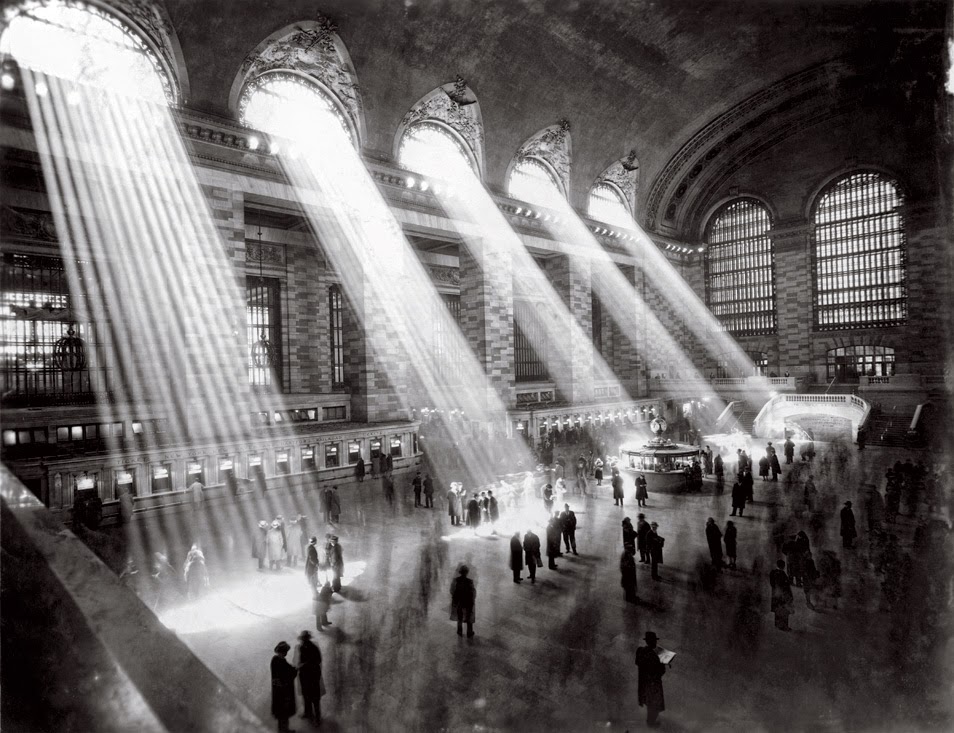
Hal Morey, Grand Central Terminal, 1930
Hi Everybody!

I hope that your weekend has been fantastic!

This week, we took a shooting field trip to Grand Central Station. It was a tricky shooting environment, since it was such a dark and gloomy day outside, but you guys were up for it and made some great photographs.

Here are some fun facts about Grand Central Station: 100 Years, 100 Facts.

We did a "photo scavenger hunt" with different shooting situations. If you missed class this week, the worksheet is on the class Dropbox. The photos you shot don't have to be from Grand Central, so if you weren't in class or if you would like to improve your photos, feel free to post anything, just so long as it fulfills the requirements.

I'd love it if you posted each item from the worksheet, but you are only required to post 5, 6, and 8 (portrait of a stranger, candid photo of a stranger, 1 subject shot at 3 different exposures). Be sure to include what the camera settings were for your shot (ISO, Shutter Speed, Aperture) and which item from the scavenger list you were shooting.

If after this week, you are still feeling uncertain about manual exposure, please let me know so we can sort it out--I want to make sure that you leave this class confidently shooting in Manual Mode.

Next week will be an Introduction to Photoshop in preparation for our first critique the following class after. Be sure to bring the following to class in addition to your camera: everything you've shot so far, a card reader and a portable hard drive. We will also be meeting individually to discuss your class projects.

That's it for now. As always, please email me with any questions or concerns!

BONUS: Any guess as to why/how the light looks so striking in the above photograph of Grand Central Terminal? Leave your guesses in the comments!

Monday, February 9, 2015

Week 2 - Homework

Vivian Meier, Self Portait
Hi Everybody!

I hope your week is off to a great start!

Just a couple of notes--I have corrected the class syllabus to state that we do not have class March 28th. We will have class February 24th, contrary to the calendar included in the syllabus--it was a typo on my part. The corrected syllabus can be found in the class Dropbox.
Also, we will have a shooting field trip next weekend, so come prepared--dress for the weather, bring your camera with a fully charged battery and memory card, and bring your Metro Card with enough on it for two subway trips.

This week we took a beginning look at manual exposure. For this week's homework, you will need to post four photographs, any subject matter you'd like, each one fulfilling one of the following requirements:
1) Frozen Movement
2) Blurred Movement
3) Maximum ("deep") Depth-of-Field
4) Minimum ("shallow") Depth-of-Field

You can use either full Manual (Setting "M") or the semi-automatic (Tv or S, Av or A) modes on your camera dial. Be sure to post the exposure (ISO, shutter speed, aperture).

As always, please email me or post to the blog if you have any questions or run into any trouble.

See you next week!

Jeremy


Thursday, February 5, 2015

How to Post to the Blog

Hi everybody!

I hope your week is going well so far.

There have been a couple of questions about how to make posts and upload photos to the class blog.

You should have received an invite to the blog. From what I can see, the majority of you have successfully become contributors, so you are all set. If you didn't receive the invitation, please let me know right away.

Here is a short video about how to make a blog post:


Here is another on how to upload a photo to the blog:


You cannot upload a raw file, so you will need to upload using the .jpg file from your camera. If you post your images to the web already using Flickr or another online service, you can link that image directly.

Just a reminder that your first post must be made before our next class this coming Saturday, so if you are running into any trouble, let me know right away!


Saturday, January 31, 2015

Week 1 - Homework

Henri Cartier-Bresson, Alicante Spain, 1933
Hi Everybody!

Thanks for a great first class—I’m really looking forward to seeing the photographs everyone makes this semester.

You should have received an email from me going over this week's homework, as well as a separate invitation to join the class blog. If you did not receive both of these, please let me know ASAP--it means that there might be a mistake on my end with your email address and I'd like to correct it as quickly as possible.

The direct link to the class Dropbox (where you will find readings and handouts after each class) is: https://www.dropbox.com/sh/hdibgd8yvg41m8t/AAC2n4dWZDdBGugoth-4eexYa?dl=0

I mentioned that I would share an example of what I mean when I say you need a card reader. Here is a link to a standard example:
http://www.bhphotovideo.com/c/product/815153-REG/Transcend_TS_RDF8K_USB_3_0_Multi_Card.html
I’m not endorsing this particular car reader—this is just to give you an idea of what to look for. You can find them many places, including B&H, Best Buy, Radio Shack, or Amazon. If in doubt, please feel free to email me.

So, on to this week’s homework!:

-Using any of the rules of composition that we discussed in class, I want you to take a photograph of something “invisible” (how you interpret this is entirely up to you!) and post it to the class blog. be sure to write what your image is a photograph of, and which compositional technique you used. 

-Send me the link to your personal blog. if you are already making a “Learning Portfolio” as part of the Parsons program, you can just send me the link to that. if you don’t already have a blog, you can create one for free using Blogger or Wordpress. If you run into any trouble, be sure to let me know.

That’s it for this week. Be sure to post these before next class. If you run into any trouble uploading or with any other aspect of this assignment, please let me know as soon as possible so I can help you out.

In the mean time, before next class I want you to start shooting as much as possible in your free time, trying out each of the Rules of Composition that we discussed in class. Also, please start thinking about what subject you might like to base your semester project on.

That’s all for now—please don’t hesitate to get in touch if you have any questions about the homework, anything we discussed in class, or any other aspects of the class.

Have a great weekend!